The copilot for construction project managers
Your construction projects, on time and on budget.
Teyvor brings together the schedule, budget, commitments, site and costs of every project. It follows everything with you and flags each variance as soon as it appears, while there is still time to act.
- No credit card
- Cancel any time
- English and French
Maple Grove Residences
Progress 27%
- CommitmentsRoofing and membrane: to commitWork starts in 7 days and nothing is committed yet.
- CostsBuilding envelope: overrun forecastForecast $906,800 against an approved budget of $849,800.
- RFIsRFI-3 still unansweredFlashing around the skylights is holding up the roofing.
- ScheduleOn scheduleProjected to finish on Jun 3, 2027, 22 working days before the contract.
Teyvor in under 30 seconds.
From the project breakdown to the last invoice.
A project never goes off track all at once. It slips a little every day: a delivery that moves, an order nobody placed, an extra that never gets billed. Teyvor shows you the same day.
How Teyvor follows your project.
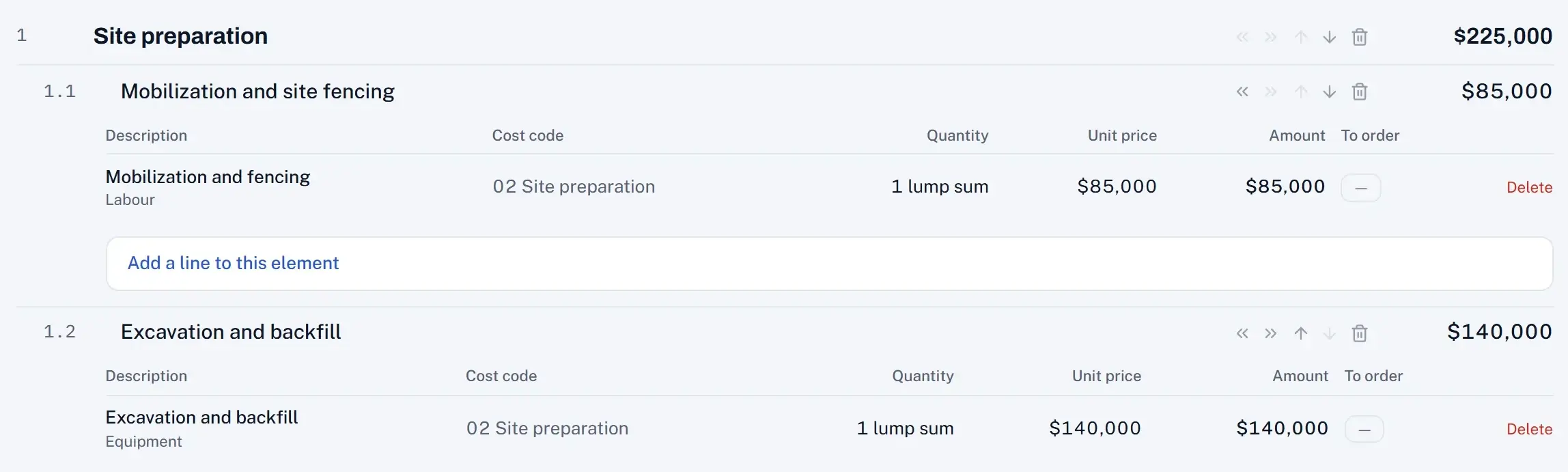
01Structure
Break the project down and give every item a budget.
Work packages, work items and cost codes: that's your WBS. Build it in Teyvor or paste it from Excel.
02Plan
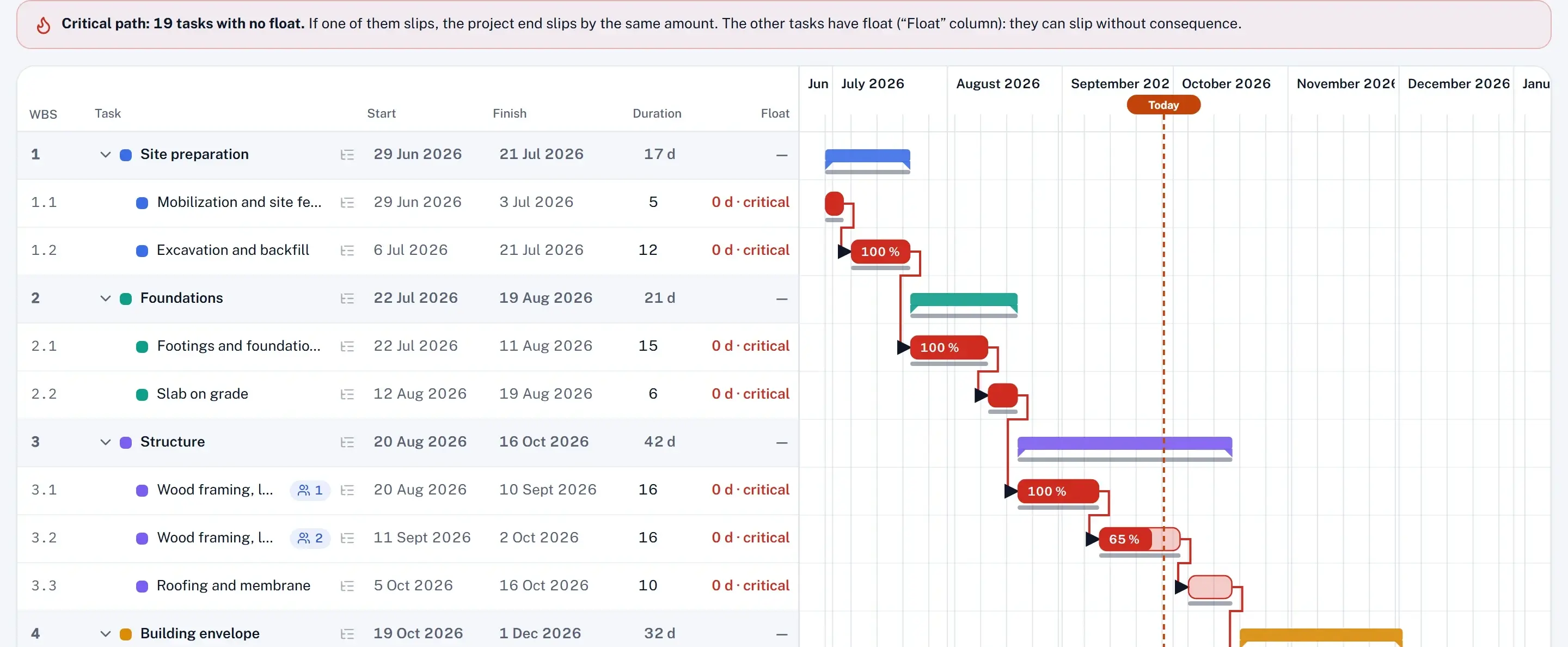
Put it on a timeline.
Durations, links between tasks, a critical path worked out for you. One click locks the reference: the dates and the approved budget.
03Follow
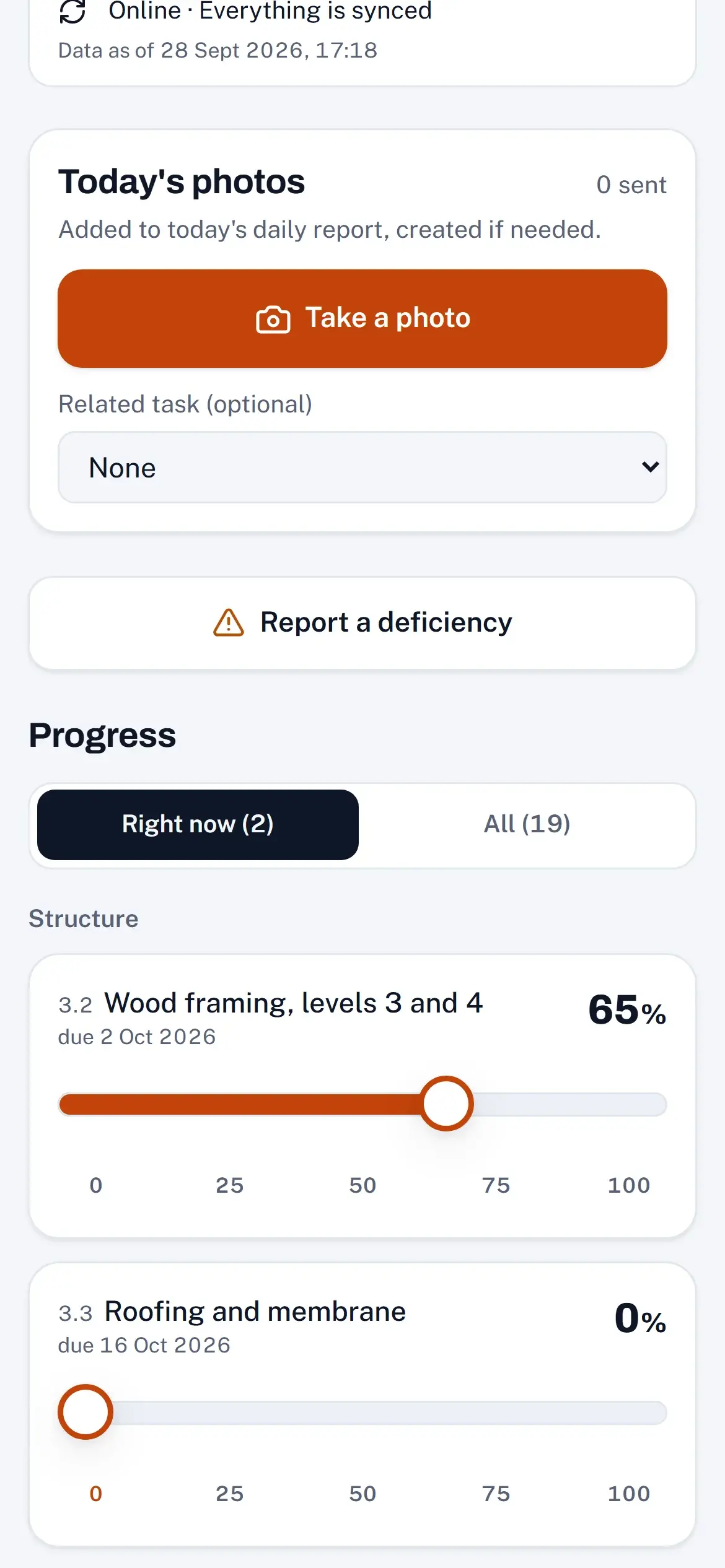
The site keeps the project current.
Progress entered from the phone, commitments, monthly actual costs: the curves move forward on their own, day after day.
04Anticipate
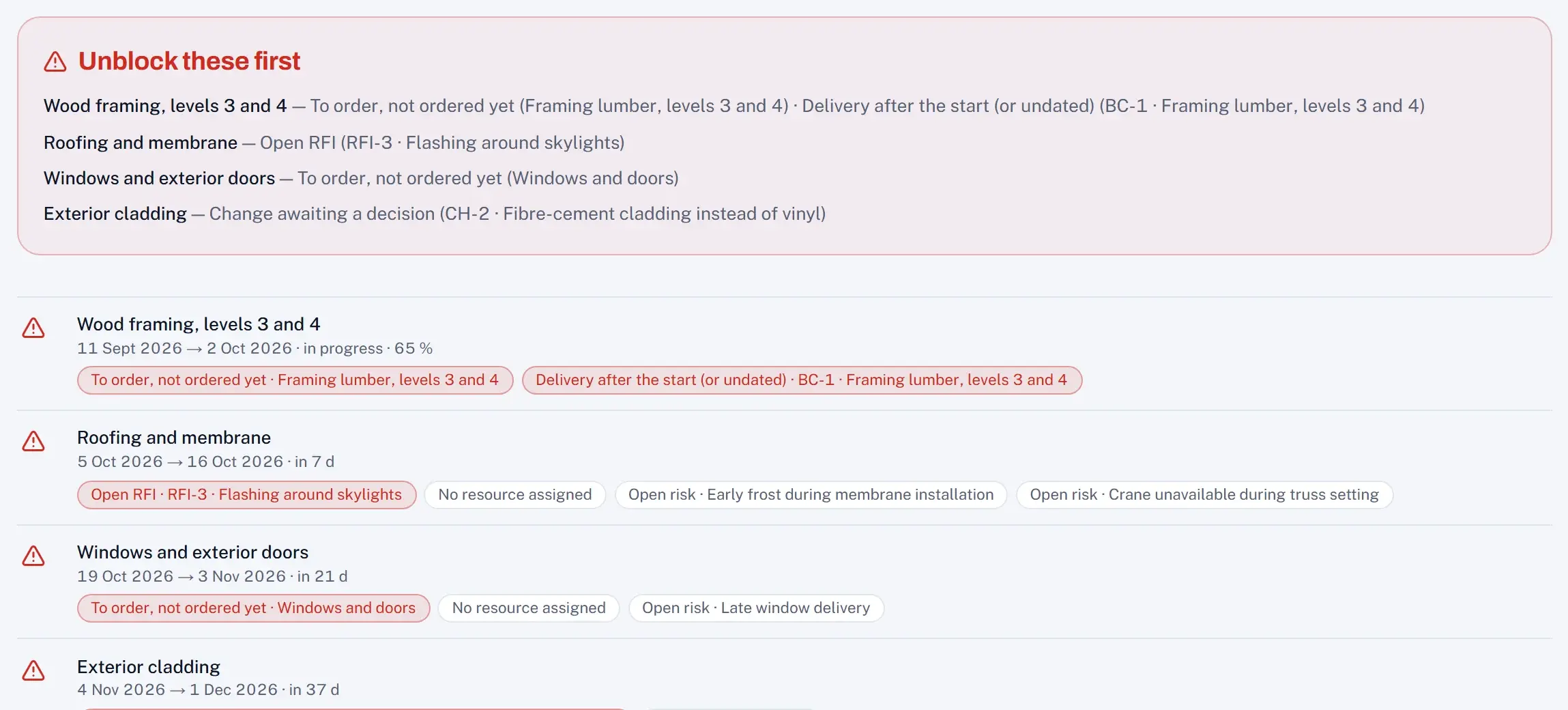
Teyvor warns you before it costs you.
Material not ordered yet, an unanswered RFI, a cost code going over: every variance shows the day it appears.
05Control
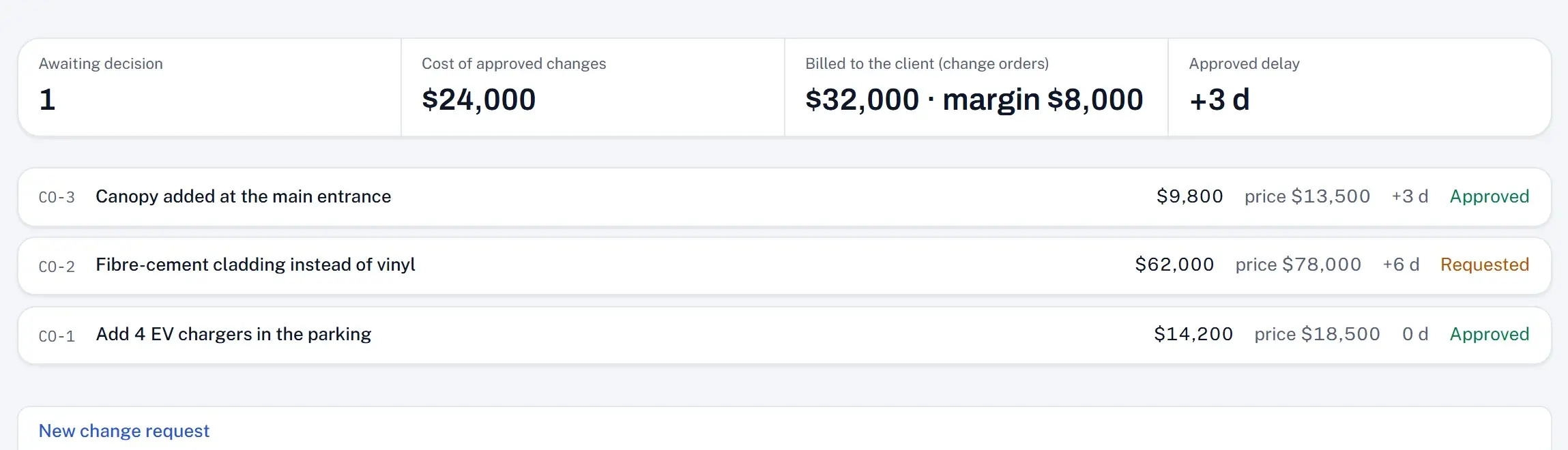
Decide, then bill.
An approved change goes to the budget and to the client's billing, margin included. You always know where the project is heading.
The whole project, in one tool.
Every module is tied to the same WBS: a delay or a cost in one place shows wherever it matters.
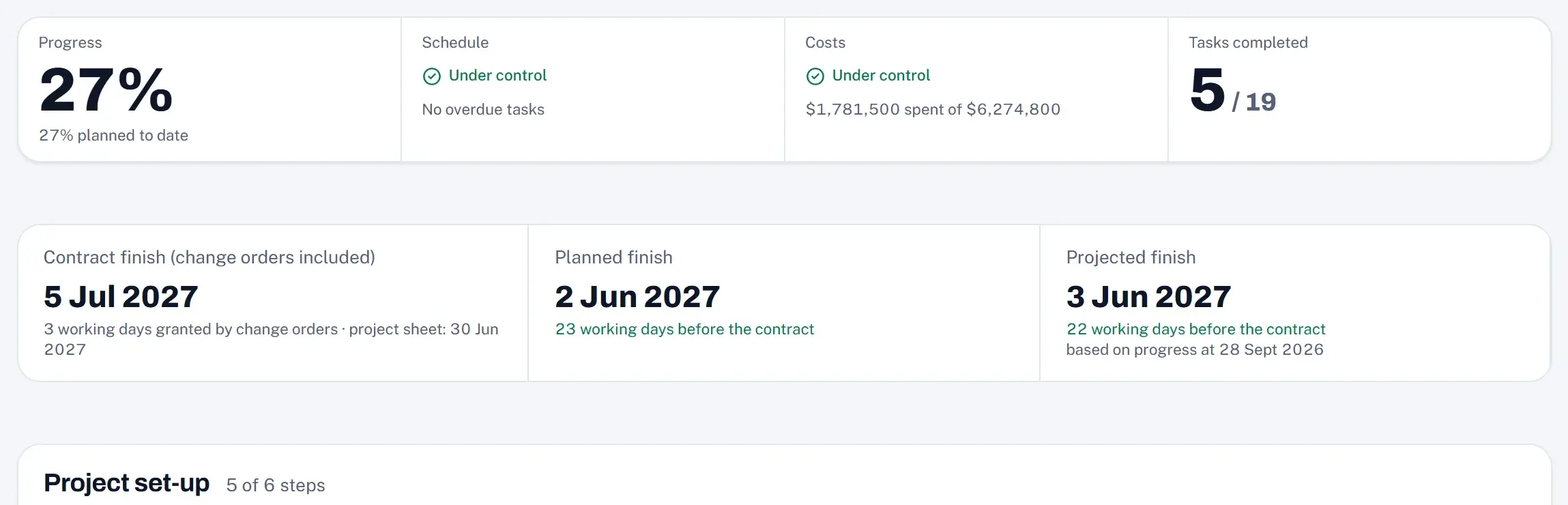
Every morning, the progress, schedule, costs and projected finish of each project.
Overview
Every morning, the progress, schedule, costs and projected finish of each project.
WBS and budget
Break the project into work packages and items, give each a budget with your own cost codes, or paste your WBS from Excel.
Schedule
Gantt, links, critical path, working calendar, initial and current baselines.
Look-ahead
The next 3, 6 or 12 weeks and what blocks each task: material not ordered, an open RFI, a change waiting for a decision.
Field mode
Progress, photos and deficiencies from the phone, even without a signal.
Cost control
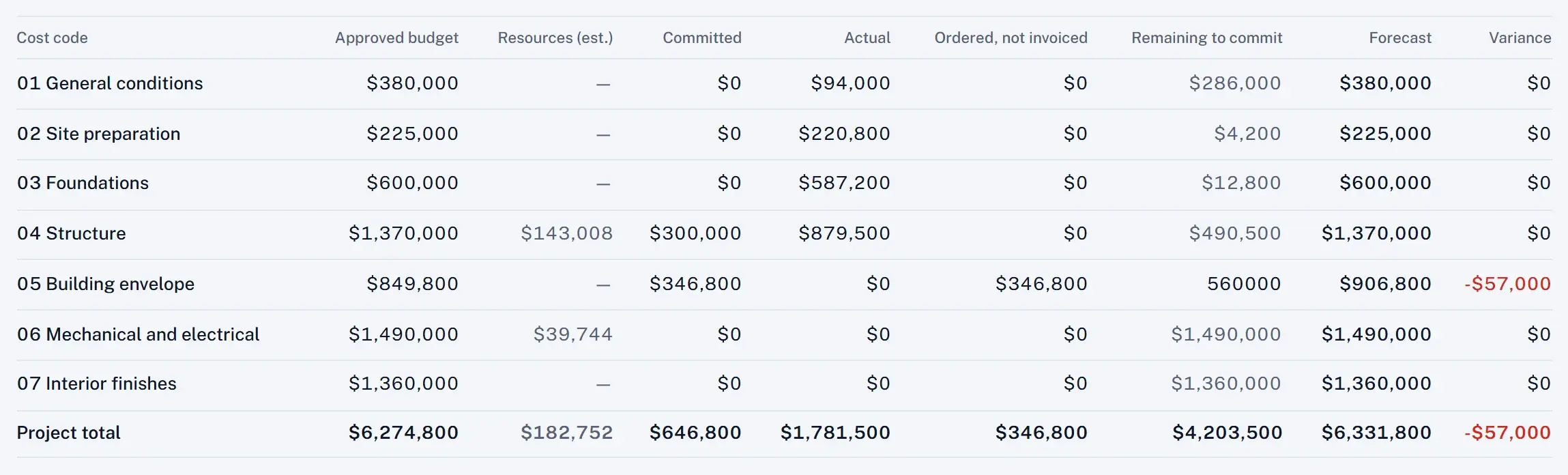
Approved budget, committed, actual, forecast and variance by code, with earned value and cash flow.
Changes and billing
Requests, decisions, change orders added to the contract, progress invoices with retainage: lump sum, unit prices or cost-plus.
- Resources,
- Commitments and deliveries,
- Site diary,
- Meetings,
- RFIs,
- Risks,
- Site photos,
- Closeout,
- Excel and PDF exports.
Your contract, as signed.
Lump sum, unit prices, cost-plus or construction management: pick the type when you create the project, and Teyvor prepares every invoice the right way.
Lump sum
Each work package × its progress
A fixed price. Each month, Teyvor proposes every work package's percentage from the progress in the schedule.
The most common in buildings.
Unit prices
Quantity done × contract rate
Paste or drop the schedule of prices: it becomes the WBS and the contract. Quantities come from the site and from your measurements.
Typical of civil works.
Cost-plus
Actual costs × (1 + fee)
Every cost is rebilled with its supplier invoice, listed on the invoice. Guaranteed maximum price and savings share as options.
For a renovation, or a scope still taking shape.
Construction management
Fee, as costs come in
The client pays the suppliers directly. You bill your fee, as a percentage or a fixed amount, and Teyvor lists what the client paid.
When the client buys directly.
A WBS element or a change can use another mode: the contract becomes mixed on its own. And any change can be billed on time and materials, at actual cost plus a markup, whatever the contract.
Why not a spreadsheet? Why not a big platform?
Both have their place. Here is where Teyvor sits.
- Schedule, budget and costs connected
- Teyvor: Yes
- Spreadsheets and email: No, one file per topicEnterprise platforms: Yes
- Built for
- Teyvor: The project manager
- Spreadsheets and email: Everyone, so no oneEnterprise platforms: The whole company
- Getting started
- Teyvor: The same day
- Spreadsheets and email: Right awayEnterprise platforms: Often an implementation project
- Price
- Teyvor: Per project manager; management and team free
- Spreadsheets and email: Already paid forEnterprise platforms: Often based on construction volume
- An overrun shows
- Teyvor: The day it's entered
- Spreadsheets and email: At the next report, if it's up to dateEnterprise platforms: Depends on the setup
Priced per project manager. Management and team members are free.
30 days free, no card. Then one plan with every module. Prices exclude tax.
- Monthly
- $49per project manager / month
- No commitment. Cancel any time.
- 10 project managers and more
- $39per project manager / month, billed annually
- Annual billing only, lowest rate.
- Management and team members
- $0
- Free and unlimited.
Sales tax, VAT or GST are added where required. Business customers can enter a tax number at checkout.
Start the 30-day free trialYour data is hosted in Canada, isolated for each company, protected by two-step verification and exportable at any time. How we protect your data
Questions we get
Do I need a card to try it?
No. You get 30 days with every feature. You only add a card when you decide to subscribe, and the first charge happens at the end of the trial.
Who pays?
Each project manager who runs projects, and the independent who works alone. Management and team members are free, and so are invitations that haven't been accepted yet.
What happens if we stop paying?
The organisation becomes read-only. Everyone can still see and export the data; nobody can edit until the subscription resumes. Nothing is deleted.
Can I bring a project I already have?
Yes. Paste your WBS from Excel or an email (each indent is one level down): a preview shows the result before anything is created. At unit prices, paste or drop the schedule of prices: it becomes the WBS and the contract.
Which contract types does Teyvor handle?
Lump sum, unit prices, cost-plus and construction management. You pick the type when you create the project; a WBS element or a change can use another mode, and the contract becomes mixed on its own. At unit prices, paste or drop the schedule of prices, then track the quantities done on site and at the office. At cost plus, every billable cost goes on the invoice with its supplier invoice, up to an optional guaranteed maximum price. In construction management, the client pays the suppliers and you bill your fee.
Do my subcontractors need an account?
No. Teyvor is the tool of the project manager and their internal team. Subcontractors appear as resources, suppliers or companies in the site diary.
Does it replace MS Project or Primavera?
For a project manager's work, yes: WBS, dependencies, critical path, baselines, working calendar and resource load are there, tied to the budget and the costs. To bring an existing schedule over, paste its task list from Excel; importing Microsoft Project and Primavera files directly is not offered yet.
Is it available in my language?
The whole application and this site are in English and French, per user. Dates and currencies follow your organisation's settings.
Where is my data hosted?
In Canada, in Montréal (AWS ca-central-1, through our database provider). Each organisation's data is isolated at the database level.